Datasource Filters
Besides the general filters, some filters are specific to one datasource. For example, Confluence has the author facet, and Slack has the channel facet. Custom datasources pushed through the Indexing API can also define their own facets.
Platform Search discovers filters with List search filters instead of facetResults. For a runnable example, see the Search with discovered filters recipe.
To uncover these datasource-specific facets, you can use our Glean UI to filter by the datasource you’re curious about. You will be able to find a list of facets for your search results, and facet values on the sidebar of the Glean UI (see image below).
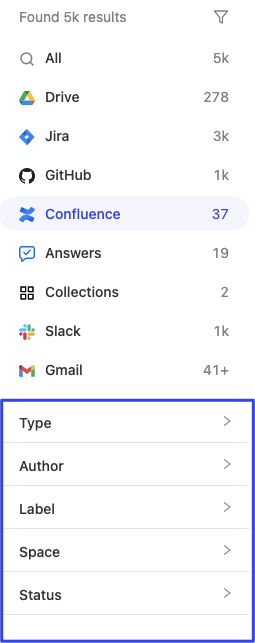
Getting possible facets via Search API
To get the same facets and values that populate the Glean UI sidebar, send a search request like this:
{
  "query": "test",
  "pageSize": 10,
  "requestOptions": {
    "facetBucketSize": 3000,
    "facetFilters": [
      {
        "fieldName": "app",
        "values": [
          {
            "value": "confluence",
            "relationType": "EQUALS"
          }
        ]
      }
    ]
  }
}
This will return a top-level field, facetResults.
facetResults has the following relevant fields:
sourceName- same as the facetfieldNamein thefacetFilters objectoperatorName- a display hint,SelectSingleorSelectMultiplebuckets- a list of facet bucket objects corresponding to a facet value- The facet bucket object has the following relevant fields:
count- the number of search results that would be returned if filtering by the facet valuevalue- the facet value (ie “engineering” for the space facet)stringValue- the string valueintegerValue- the integer value (not common)displayLabel- alternative value used for display in the UIiconConfig- optional image used to represent the facet value, such as a profile picture for people facet values.
- The facet bucket object has the following relevant fields:
{
  "sourceName": "space",
  "operatorName": "SelectMultiple",
  "buckets": [
    {
      "count": 3,
      "value": {
        "stringValue": "engineering"
      }
    }
  ]
}
The sourceName values in facetResults are the facets you can use with that datasource. Pass a bucket's stringValue unchanged as the filter value.
If latency is a concern, and you only want to receive facetResults, you can send a request with pageSize = 0, and add "FACET_RESULTS" within the responseHints field in requestOptions to not retrieve any documents and only retrieve facetResults. See sample request body below, which would gather facetResults for all confluence specific facets:
{
  "query": "test",
  "pageSize": 0,
  "requestOptions": {
    "facetBucketSize": 3000,
    "facetFilters": [
      {
        "fieldName": "app",
        "values": [
          {
            "value": "confluence",
            "relationType": "EQUALS"
          }
        ]
      }
    ],
    "responseHints": ["FACET_RESULTS"]
  }
}